Device Tree Structure
Below snippet shows the Device Tree information of the PCIe node in the CED example design:
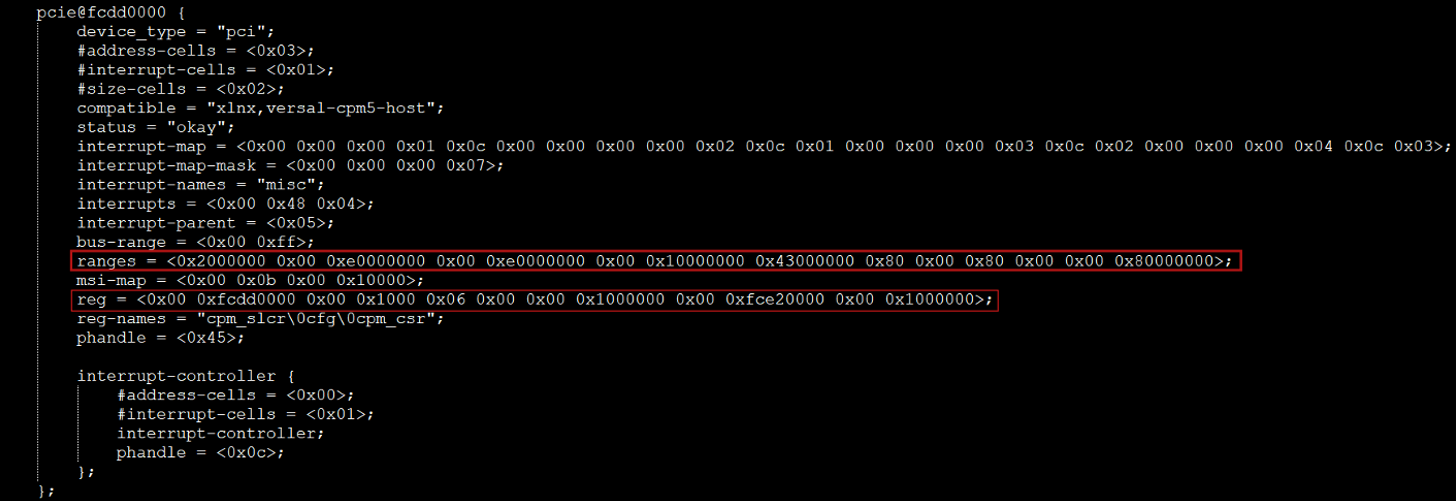
The reg property defines the physical addresses and sizes of various hardware registers.
It is specified as a sequence of (address, size) pairs, corresponding to entries in the reg-names property:
reg-names = "cpm_slcr\0cfg\0cpm_csr";
reg = <0x00 0xfcdd0000  0x00 0x1000
       0x06 0x00000000  0x00 0x1000000
       0x00 0xfce20000  0x00 0x1000000>;
Explanation
cpm_slcr
- Address: 0x00 0xfcdd0000
- Size: 0x00 0x1000 (4 KB)
- Description: CPM5 System Level Control Register (SLCR)
cfg
- Address: 0x06 0x00000000
- Size: 0x00 0x1000000 (16 MB)
- Description: ECAM (Enhanced Configuration Access Mechanism) space
cpm_csr
- Address: 0x00 0xfce20000
- Size: 0x00 0x1000000 (16 MB)
- Description: CPM5 DMA0 Control and Status Registers (CSR)
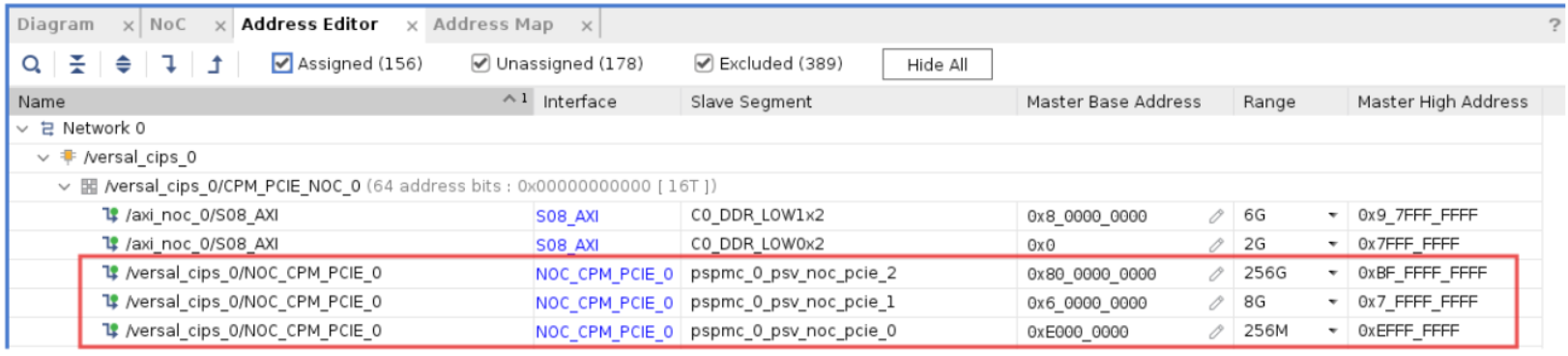
The ranges property in the Device Tree is derived from the CPM5 IP configuration,
specifically from the AXI: BARs tab in the IP configuration GUI.
ranges = <0x2000000  0x00 0xe0000000  0x00 0xe0000000  0x00 0x10000000
          0x43000000 0x80 0x00000000  0x80 0x00000000  0x00 0x80000000>;
This entry defines how PCIe address regions are mapped to the CPU address space. It includes two Base Address Registers (BARs):
Entry 1: 32-bit BAR (BAR0 / PCIe Region 0)
- 0x2000000 — Flag indicating a 32-bit memory BAR
- 0x00 0xe0000000 — PCIe address (BAR0)
- 0x00 0xe0000000 — Corresponding CPU address
- 0x00 0x10000000 — Size: 256 MB
Entry 2: 64-bit BAR (BAR2 / PCIe Region 2)
- 0x43000000 — Flag indicating a 64-bit memory BAR
- 0x80 0x00000000 — PCIe address (BAR2)
- 0x80 0x00000000 — Corresponding CPU address
- 0x00 0x80000000 — Size: 2 GB
Note
Although BAR2 is configured as 256 GB in the AXI:BARs tab of the CPM5 IP GUI, the IP driver allocates only 2 GB, which is sufficient for operation.
PCIe Region 1 (BAR1) with a base address of
0x06_00000000is reserved for ECAM (Enhanced Configuration Access Mechanism) space.All BAR assignment details are also shown in the Address Editor tab, as illustrated in the following snippet: