aiecc: the MLIR-AIE compiler driver
aiecc takes an AIE .mlir design and produces the artifacts needed to run it
on an NPU (instruction streams, ELFs, PDIs, xclbins, …).
To also build a host program that drives the array, pass --get-host
and put the host C/C++ sources after a --
User guide
The two most common flows
1. Instruction-sequence + xclbin flow. The host loads an xclbin (which
contains the array configuration) and, at dispatch time, streams a
per-runtime-sequence NPU instruction binary to the device:
aiecc --get-npu-insts --get-xclbin design.mlir
# -> insts_<device>_<seq>.bin   (one per runtime sequence)
# -> aie.xclbin                 (configuration PDI, packaged)
2. Full-ELF flow. Everything — all device PDIs and instruction streams — is bundled into a single loadable ELF instead of an xclbin plus loose binaries:
You can override these output file names with --npu-insts-name,
--xclbin-name, and --full-elf-name. You can filter which devices and
runtime sequences are compiled with --device-name and --sequence-name.
Parameterized C++ transaction builders
aiecc --get-npu-cpp design.mlir
# -> npu_<device>_<seq>.cpp (one standalone C++17 builder per selected sequence)
C++ builders and static instructions share runtime-sequence materialization,
reconfiguration expansion, DMA lowering, PDI-ID assignment, and device/sequence
filtering. This includes aiex.configure/aiex.run, --expand-load-pdis, and
--load-pdi-to-ctrl-pkt; C++ output does not require a static instruction binary.
Designs containing cores to compile require the core toolchain even when only transaction builders or instructions are requested: buffer placement follows core compilation so it can reserve space for the core's static data. Designs without cores remain compiler-free; the generated C++ itself needs only a host compiler.
Include the generated file in a C++17 host program with MLIR-AIE's include
directory on the compiler's include path. Call
generate_txn_<device>_<seq>(...) with the runtime sequence's scalar arguments
in declaration order. Memref arguments are not C++ parameters: transactions
reference their host-buffer argument indices for runtime address patching.
The result is std::optional<std::vector<uint32_t>> containing unpatched
transaction words, or std::nullopt if a dynamic DMA field fails validation.
For reconfiguration, the host must also provide referenced PDIs and
control-packet data according to its runtime's ABI.
--npu-cpp-name: output filename;{0}expands to the device/sequence key. Select one sequence when using a fixed filename.--npu-cpp-emit-dispatch-shim: adddispatch_abianddispatch_generateC entry points for shared-library loading (off by default).--get=npu_lowered.mlir: also save the final runtime-sequence IR.
Builders default to the instruction-buffer DDR-patch ABI (--get-npu-insts),
or the unfolded ABI when combined with --get-full-elf.
--fold-ddr-addr-offset=true|false overrides the builder's choice; full-ELF
instructions always remain unfolded.
Full ELF still requires static instructions. Executing a parameterized builder requires a host runtime that can submit and patch its generated transactions; generating C++ alone does not add dynamic full-ELF support.
Limiting parallel compilation
aiecc compiles independent parts of a design, including its cores, in
parallel. Use -j N (or --nthreads=N) to limit that parallelism. -j 1 runs
compilation sequentially; -j 0 uses the machine's hardware concurrency and
is the default.
To apply a limit to every aiecc invocation without changing each caller, set
the AIECC_JOBS environment variable:
An explicit -j or --nthreads takes precedence over AIECC_JOBS, which in
turn takes precedence over the default. The environment variable accepts the
same non-negative integer values as -j, including 0 for auto-detection.
-j also sizes the thread pool MLIR runs the per-device pass pipelines on, and
-j 1 keeps them on one thread. With the pinned MLIR wheel, which is built
without MLIR threading, those pipelines run on one thread either way.
Reusing compiled devices: --device-cache
--device-cache=<dir> keeps what compiling each aie.device's cores produced
(its buffer placement and linked core ELFs) in <dir>, and a later build whose
device is unchanged reuses them instead of compiling its cores again:
A device is reused only when its routed IR, the module's other top-level ops,
the contents of every file its cores link, the command line and the aiecc
and Peano binaries all match, so changing one device in a multi-device design
recompiles just that device. Outputs are byte-identical to a build without the
cache. -v reports each device's hit, miss and store.
The cache is Peano-only, and a build that emits something from inside a
core's compilation (--get-core-elfs, --get-locmap, --dump-intermediates)
bypasses it. Concurrent builds can share a directory. Nothing is ever evicted;
delete the directory to reclaim space.
Cores that run one program: --no-share-core-objects
Cores that run the same program over their own buffers and locks are compiled
once: the first such core's module runs opt and llc under positional
symbol names, and every core links that object with the names renamed back to
its own. The core ELFs are byte-identical to compiling each core on its own.
--no-share-core-objects compiles each core separately, should the sharing
ever need to be ruled out.
Building the link files meanwhile: --await-link-files
With --await-link-files, aiecc lowers the design but reads no file a core
links (link_with, link_files) until a line arrives on its standard input,
so a caller can build those objects while aiecc works. Standard input closing
before that line fails the build. The IRON JIT uses this to compile a design's
kernels while aiecc lowers it.
Core memory placement and validation
aiecc checks stack and ordinary static-data requirements after linking.
Explicit bank annotations are also checked by default, for both Peano and
Chess; --no-check-bank-placement disables that check.
The separate, opt-in --check-lut-banks verifies LUT table-pair separation.
It requires Peano-readable LLVM IR in object-linked kernels, or optimized
core IR for merge-mode kernels; Chess compilation/linking is unsupported.
Neither check replaces the allocator's stack/buffer overlap checks or the
linker's region limits.
See Core Data Memory for
data_size, stack_bank/stack_address, portable AIE_BANK_A–AIE_BANK_D
annotations, IR-retention options and verification limitations.
Seeing what the compiler will do / dry-running: --emit-dot
The compiler builds its execution plan from the flags you pass.
Adding --emit-dot prints that plan (as a GraphViz graph) for exactly the
requested outputs and options and exits without compiling anything. You omit
the input file when you pass --emit-dot, as no compilation actually takes
place. For example, this shows the plan for the NPU-instruction flow and
renders it to an image:
Each box is a compilation step labelled by the artifact it produces, arrows show
dependencies between steps, and the outputs you requested are highlighted.
Changing the output flags (for instance to --get-full-elf) changes the
graph accordingly, so this is the fastest way to understand what a given
invocation will actually do. The command above produces this graph:

Stopping and restarting a build: --checkpoint and --resume
Sometimes you want to interrupt compilation partway through, look at or modify
an intermediate result, and then continue from that point rather than starting
over. --checkpoint and --resume let you do exactly that.
First, compile up to some intermediate stage and save the result. Here we stop
at the routed physical IR (--cut, described below, selects where to cut) and
write the checkpoint into the directory cp:
--cut stops the build at the named edge — nothing downstream of it runs, so no
final artifacts are produced — and snapshots that frontier. It requires
--checkpoint to say where to write the snapshot. The artifacts you eventually
want are built later, by --resume.
Now you can open the intermediate files saved in cp and edit them — for
instance, to hand-tweak the IR and see how a change affects the rest of the
build. When you are ready, resume from the checkpoint and ask for the artifact
you want (--get, described below). The saved frontier is read back from disk
(IR frontiers are re-parsed from their .mlir text), the stages before the
checkpoint are skipped entirely, and only what comes after runs:
The resume invocation rebuilds the graph from the flags recorded in the
checkpoint manifest, so it inherits the original device, toolchain and lowering
options automatically — you neither repeat them nor may override them. --resume
rejects any graph-shaping flag on its command line, since changing the graph
would invalidate the saved intermediates; only execution-only flags may
accompany it: --get, --cut, --checkpoint, -j, -v/--verbose, and
--progress.
This makes it easy to isolate a problem: compile up to just before a stage you suspect, change the intermediate result by hand, and re-run only what comes after it.
Adding --emit-dot previews where the checkpoint will cut the build. Here the
NPU-instruction flow is cut right after routing produces the physical IR: the
steps run before the cut are shaded green (the --cut frontier, whose artifacts
are saved to disk, darker), and the steps a --resume runs afterwards sit
across the dashed red cut arrows. Each edge runs at most once across the pair:
the prefix and frontier during --checkpoint, the downstream steps during
--resume (which reloads the frontier from disk rather than rebuilding it).

If an error occurs during compilation, aiecc will dump a checkpoint
capturing the state up to the first failing edge. This allows you to submit
a checkpoint as a reproducer, or investigate the issue yourself using the
exact inputs the failing step saw.
Extracting a single artifact: --get
--get=<name> asks for any single artifact in the build by name, including
intermediates that don't have their own --get-<name> shorthand (such as the
per-core objects or the routed IR). Run with --emit-dot to see the available
names; passing an unrecognized name prints the full list.
aiecc --get=objects_{0}.o design.mlir           # just the per-core objects
aiecc --get=input_physical.mlir design.mlir     # just the routed IR
--get and --resume work well together when you want just one final artifact
without redoing the whole build. First checkpoint all the intermediates up to
some stage, then resume and ask only for the one output you want; the compiler
reuses the checkpointed intermediates instead of recomputing them:
aiecc --cut=physical_with_elfs.mlir --checkpoint=cp design.mlir
aiecc --resume=cp/manifest.json --get=cdo_{0}   # only the CDO, from the checkpoint
Finding the pass that broke the IR: --verify-each
aiecc verifies the IR each pass pipeline produces, rather than after every
pass as aie-opt does; on a large design the per-pass verification costs more
than the passes. If a pipeline produces invalid IR, rerun with --verify-each
to verify after every pass and learn which one it was.
Developer guide
aiecc captures the build steps required for each requested output artifact
as a static graph: every kind of intermediate is a Node, every
transformation an edge, and the engine runs only the edges needed for the
artifacts you asked for.
Edge, Node, Item — and keys
Item<T>— one typed intermediate or output artifact; a payload of typeT(e.g., JSON, IR module, vector of bytes) plus akey, which uniquely identifies the payload among its peers. Items are materialized to disk lazily, i.e., only when a downstream edge needs them on disk. Payload types and their disk serializers live inItems.h.Node<T>— the collection of allItem<T>artifacts produced by one edge; for many edges this wraps a single item (e.g.aie.elf), but for some it contains many (e.g. the per-AIE-core.ofiles).Edge— a transformation from input node(s) to an output node, performing some action (a lambda, aPassPipeline, or aShellCommand). Edges may change the cardinality of the input/output nodes, e.g. split or join, or apply a transform to each item (map) -- see below.
Keys are what make fan-out/fan-in well-defined: an edge that splits a module
per-device produces one item per device, each with a stable key (the device
name). Downstream edges zip nodes by key, so a core's object, its ld script,
and its arch string all line up. Keys also name checkpoint frontier entries. In
edge output names/file paths, {0} gets substituted for each item's key.
Keeping the graph static
If you are adding logic to the driver, the single rule that makes everything
else work is: the graph declaration is static, and every dependency and every
file written must flow through the graph and the Item abstraction. Never
read inputs or write outputs out-of-band.
Why this matters
- The graph is declared unconditionally. No guards around edge construction
— every edge always exists. The engine prunes backward from the requested
outputs, so unrequested work never runs.
--emit-dot,--checkpoint, and--resumerely on this static shape. Itemowns materialization. AnItem<T>holds a typed payload and only writes it to disk when a downstream edge asks for its path viaasFile(). Intermediates that nobody needs on disk stay in memory automatically. If you write files yourself, you defeat this and break checkpointing.
Keep both invariants and the user-facing features above come for free.
Edge types
Each diagram shows the items (with their keys) of the input and output nodes and how the edge relates them.
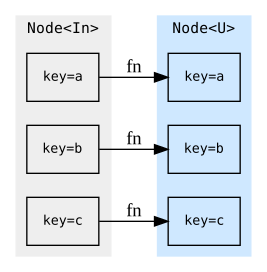
map<U> — one output item per input item, applying the action
element-wise and preserving keys.
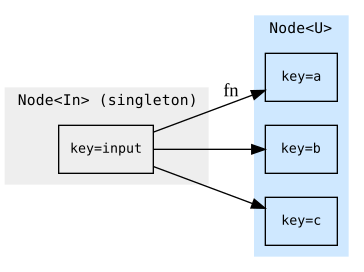
split<U> — explode a singleton input into many keyed output items.
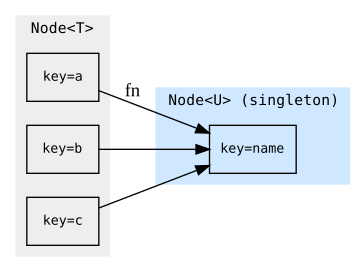
join<U> — fold every item of a node into a single output item.
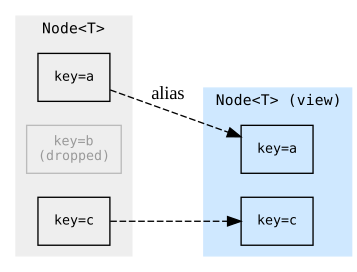
filter — a zero-copy view keeping only the items whose payload matches;
the surviving output items alias their source items rather than copying.
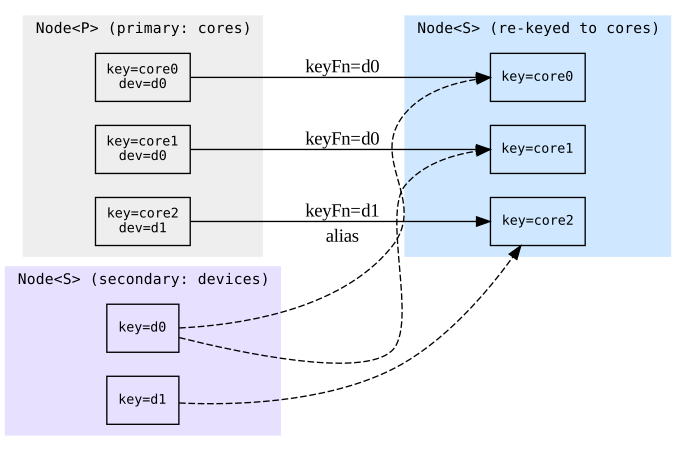
rekeyFrom<S> — re-key a secondary node onto this node's keys (a broadcast
/ keyed join): one output item per primary item, aliasing the secondary item
whose key equals keyFn(payload). Below, each core picks up its device's item.
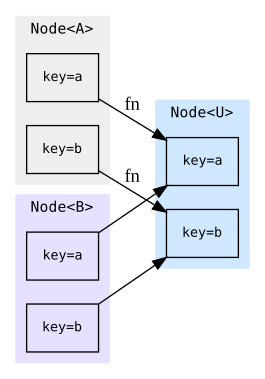
bundle(a, b, …).map<U> — zip several nodes by key and run the action on
the matched items together, producing one output item per key.
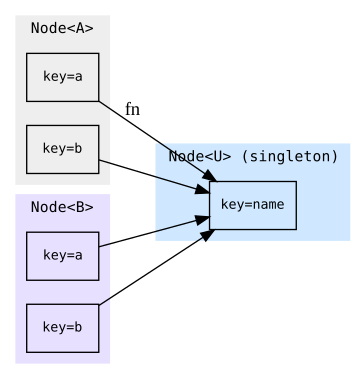
bundle(a, b, …).join<U> — zip several nodes by key and fold all the
matched items into a single output item.
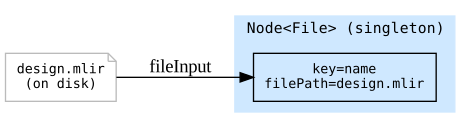
fileInput — seed the graph with an existing on-disk file; it has no input
node and produces a singleton Node<File>.
Mark an edge .threadSafe() only when its action touches no shared state
(external-tool invocations); such edges fan their per-key work across -j.
Putting it together: scatter / gather
A worked slice of the real driver — split a module per core (scatter), compile each core in parallel, then link each core against its object plus its script (gather over multiple keyed nodes):
// Scatter: one item per aie.core, keyed by "<device>_core_<col>_<row>".
auto &cores = physical.split<OpInModule<CoreOp>>(
    "perCore_{0}.mlir",
    SplitIRAction<CoreOp>([](CoreOp c) { return coreKey(c); }));

// Element-wise maps: each core gets its own object and ld script. The .o edge
// shells out to a tool, so it is thread-safe and runs under -j.
auto &objects = cores.map<ModRef>("lowered_{0}.mlir", lowerCore)
                     .map<File>("objects_{0}.o", ShellCommand{"llc"} /*...*/)
                     .threadSafe();
auto &scripts = cores.map<std::string>("ld_{0}.script", emitLdScript);

// Gather: zip the object and script nodes by key, link per core.
auto &elfs = bundle(objects.out, scripts.out)
    .map<File>("elfs_{0}.elf",
               ShellCommand{"clang"}.input().input("-Wl,-T,").output("-o"))
    .threadSafe();
Each core flows independently from cores through to elfs; nothing hits disk
unless a downstream consumer (or a requested output) calls asFile(). Add a new
artifact by declaring more edges off an existing node and appending the terminal
edge to outputs — the engine and every user-facing feature above adapt
automatically.
For the full picture, start from buildMainGraph in aiecc.cpp, then read
Graph.h (edges) and Items.h (payloads).